- Photos of you. I used four of my face, in good light, and three more in the clothes I wore on the recording day.
- Nano Banana, Google Gemini's image model, for the drawing. It takes several reference photos at once: that's how she ends up looking like you.
- Your voice, recorded separately. I recorded it with the phone's Voice Memos, each line twice, and kept the best one.
- Higgsfield, with credits. It's paid. It's what animates her INSIDE your video, sitting on your shoulder and with your light.
- Claude Code or Codex with access to your files and tool execution. The agent prepares the audio, edits and fixes the video. You bring the material and review the delivery.
AI video · Guide + prompts
Make your mini me with AI and put her in your video.
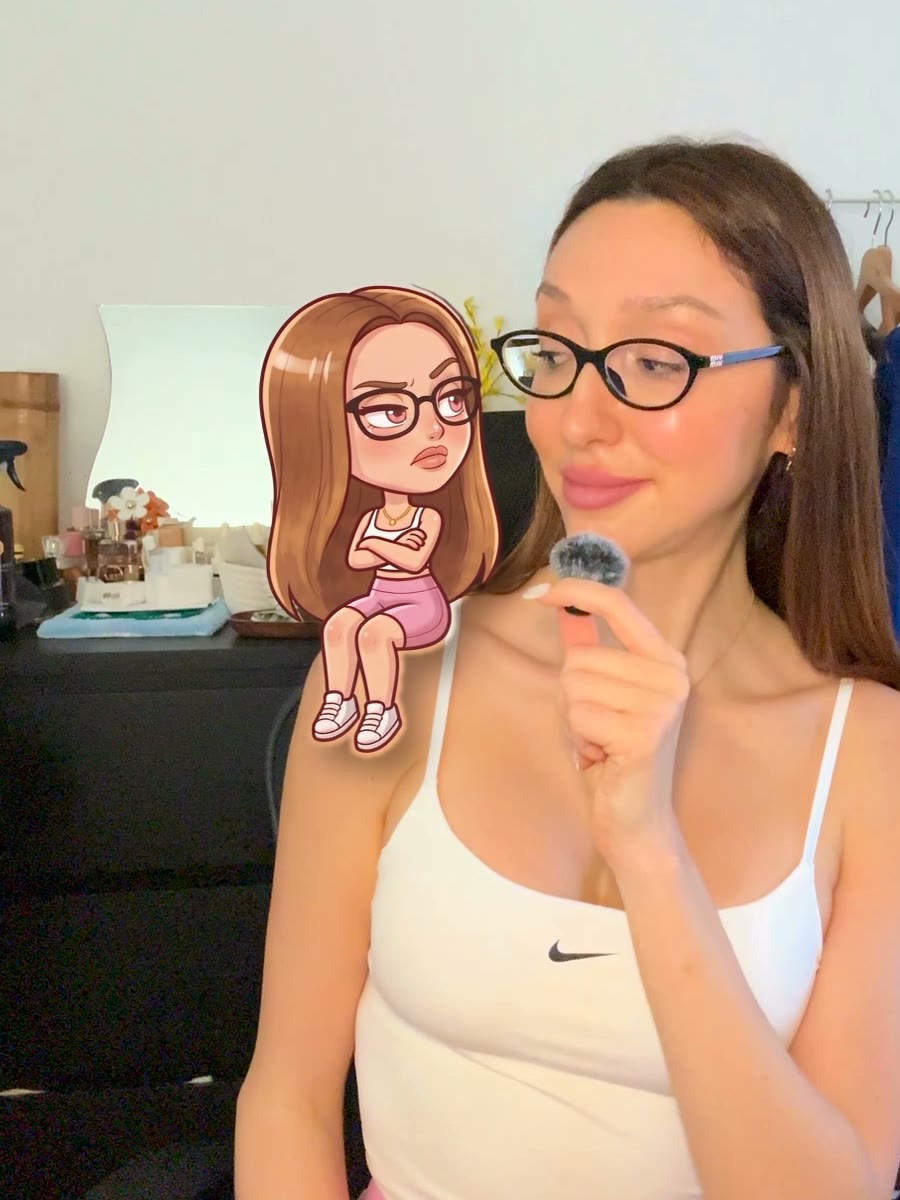
I drew a mini version of myself with Nano Banana and animated her with Higgsfield inside my own video, sitting on my shoulder and answering me back in my own voice. Claude and Codex did the editing and the fixes. Here's the step by step and the brief so the agent works on your files: prompts to adapt, your original voice, synced lips and a clean outline.
The drawing: Nano Banana
The animation: Higgsfield (paid)
Her voice: yours, higher
The kit
Prompts to draw and animate, the full brief for Claude or Codex and a delivery guide.
01What you need
Photos of you, your voice, Nano Banana and Higgsfield.
⌄
What you need
Photos of you, your voice, Nano Banana and Higgsfield.
02The drawing, with Nano Banana
Four prompts: the character sheet, dressed like you, from the front and the final touch-up.
⌄
The drawing, with Nano Banana
Four prompts: the character sheet, dressed like you, from the front and the final touch-up.
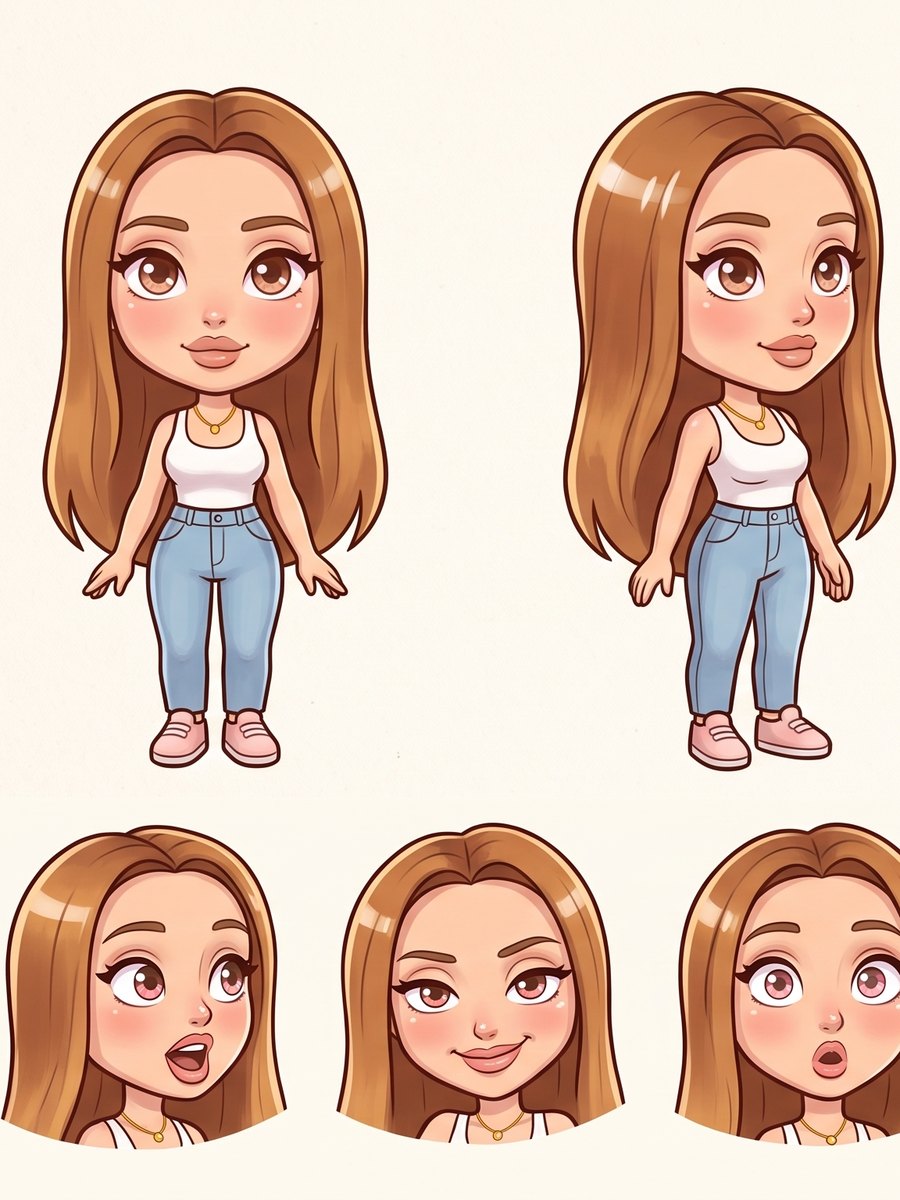
Give it your four face photos along with the first prompt. Change what's between square brackets to what you look like. Ask for chibi and describe the finish: a warm brown outline, gouache-style shading and eyes with a pink sparkle. Use a single approved sheet as the reference for the whole video.
1 · The character sheet (with your 4 photos)
Character model sheet for a tiny animated sidekick: a chibi cartoon version of the young woman in the reference photos, who will pop up next to her in a social video as her cheeky inner voice. Proportions: big head, about one third of total body height, small body, tiny hands and feet, like a premium chibi mascot. Art style: polished modern 2D animation, the look of a high-budget animated commercial: smooth variable-weight brush outlines in warm dark brown (not black), soft gouache-like shading with a gentle rim light, glossy hair shapes with two highlight streaks, big sparkling eyes with a pink catchlight, subtle blush. Stylish and cute, never generic emoji or avatar style. Keep her recognizable: [long straight light-brown hair with warm auburn tones and a center parting, fair skin, rosy cheeks, light brown almond eyes, full soft lips, thin gold necklace]. Outfit: [fitted white tank top, light blue high-waisted jeans, soft pink sneakers]. Layout on a plain warm off-white paper background: top row, full body front view, three-quarter view, side view, and one action pose waving hello; bottom row, six head expressions: talking with mouth open, cheeky smirk, surprised, unimpressed with one eyebrow up, laughing with eyes closed, winking. No text labels. Identical character design in every drawing.
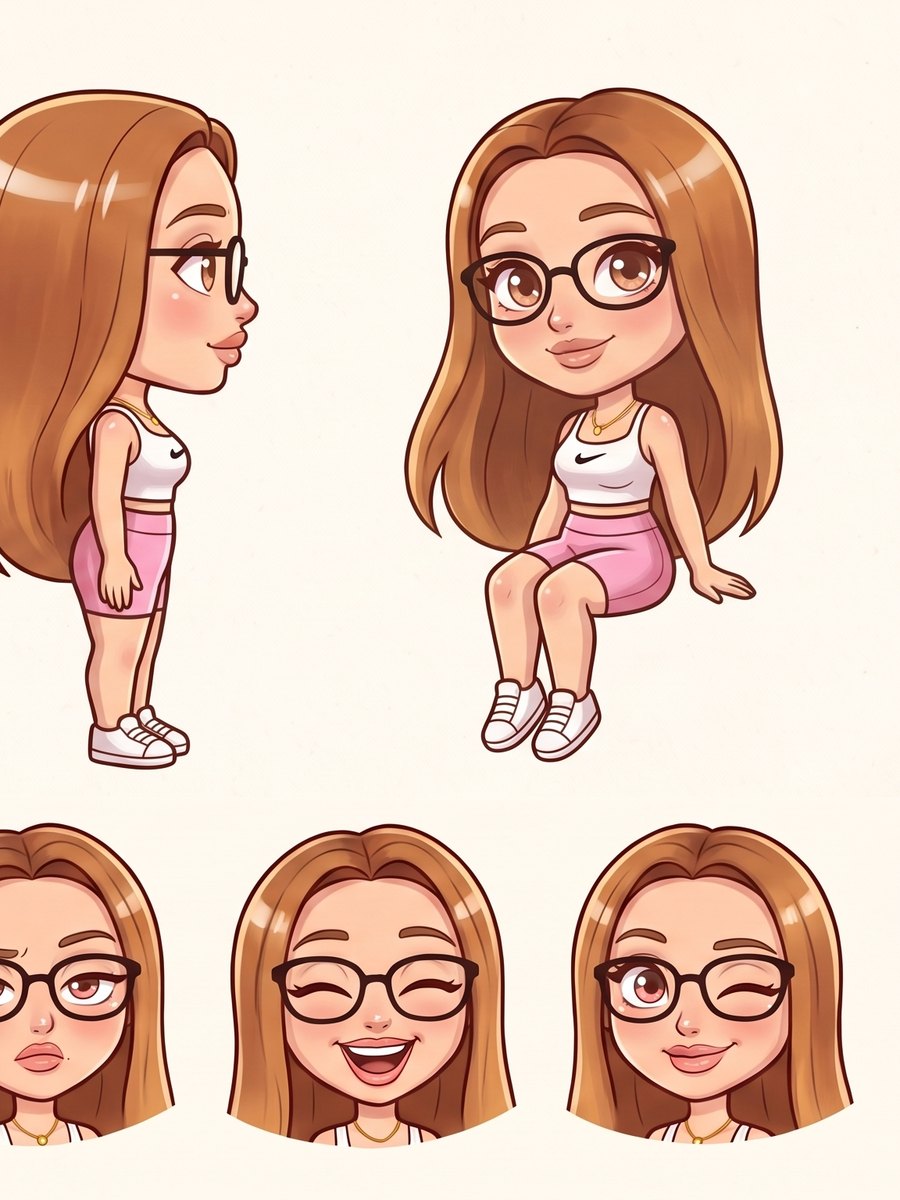
Now dress her the way you'll be dressed in the video: give it the sheet you got as the FIRST image and, after it, three photos of you in those clothes.
2 · Dressed like you (the sheet + 3 photos in the clothes)
Character model sheet of the SAME chibi character as in the first reference image (the approved model sheet): exactly the same art style, proportions (big head about one third of the height), face, big brown eyes with pink catchlight, [long straight light-brown hair with center parting], warm brown outlines and soft gouache shading. Change ONLY her outfit and add glasses, copying them from the photos of the real woman: [black oval glasses with thin frames; a white cropped tank top with thin spaghetti straps and a small black Nike swoosh on the chest; pink high-waisted bike shorts; white sneakers; thin gold necklace]. Layout on a plain warm off-white paper background: top row, full body front view, three-quarter view, side view, and sitting down with legs dangling as if sitting on someone's shoulder; bottom row, six head expressions, all wearing the glasses: talking with mouth open, cheeky smirk, surprised, unimpressed with one eyebrow up, laughing with eyes closed, winking. No text labels. Identical character in every drawing.
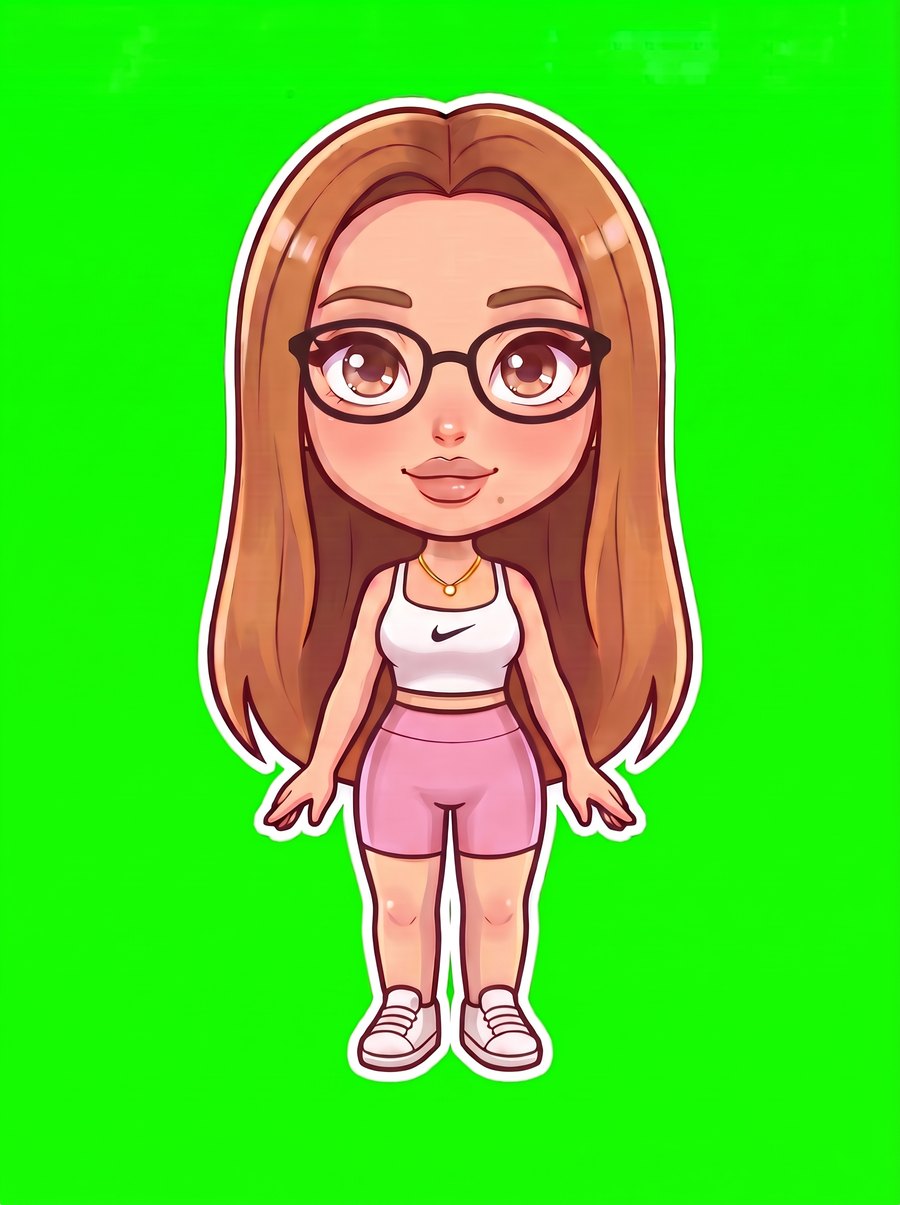
Prepare a clear reference of the mini from the front and on her own, to animate her. Give it the dressed sheet as the first image.
3 · From the front, on green (the dressed sheet)
Draw exactly the character from the first reference image (front view, top-left of the sheet): same face, [black oval glasses], hair, [white cropped tank with small black swoosh, pink bike shorts, white sneakers, gold necklace], same art style, outlines and shading. Single character, full body, standing facing the viewer with a friendly closed-mouth smile, arms relaxed, centered with space around. Background: a completely flat uniform bright green (#00FF00), no ground shadow, thin white outline around the character.
Touch up the identity details before animating: the size of the mole, the glasses and the clothes. The next prompt uses the mole as an example; change the instruction between square brackets to the detail you want to adjust.
4 · The touch-up (the front image)
Edit this exact image. [Shrink the beauty mole below the lower lip to a TINY dot: about one third of its current diameter, soft light warm brown, only noticed when looking closely. Same position.] Do NOT touch the glasses: keep the same thin round black glasses exactly as they are. Change NOTHING else: same pose, size, face, eyes, hair, outfit, outline and the same flat bright green background.
To edit, one single image and “Change NOTHING else”. That way you reduce the risk of it mixing features from different references. Check that the rest of the face keeps the approved design.
03Her voice
Your voice, a bit higher.
⌄
Her voice
Your voice, a bit higher.
Her voice is mine, with the pitch raised four semitones without changing the speed, so it sounds like a cartoon without sounding like a robot. In my video, Claude and Codex processed it with ffmpeg. Give this command to the agent so it runs it on your recording:
Raise the pitch 4 semitones (ffmpeg)
ffmpeg -i her-line.m4a -af "aresample=48000,asetrate=48000*1.2599,aresample=48000,atempo=0.7937" her-line-mini.wav
No echo. Keep a clean voice with no echo. If a line goes in the background, lower its volume. The command first normalizes to 48 kHz so the speed stays the same even if you recorded at 44.1 kHz.
04Prepare the dialogue and record
One shot and one WAV lined up, with the shoulder free.
⌄
Prepare the dialogue and record
One shot and one WAV lined up, with the shoulder free.
- Record the dialogue. Record your lines and the mini's separately. Keep the original takes and write down who says each line. Claude or Codex takes care of cutting the answers and placing them in their gaps.
- Hand over the audio prep. Ask the agent to prepare one WAV per shot: the same length as the video, silence while you talk and the mini's line when she answers. Give it the command from the voice section. The reference audio doesn't guarantee that a generation will keep your voice or your language; the edit has to keep your original recording.
- Lock the character. Use the same sheet and the same front image in every shot. Adjust hair, glasses, clothes and mole in the prompts. If you don't wear glasses, also remove the mentions of glasses outside the square brackets. The green is a working background, it doesn't have to appear in the final video.
- Record with room. Keep your shoulder free and move your hair out of the way. Keep the camera and the light steady. Listen to the mini's answers first so you leave the exact gap. If she jumps into your hand, do the real gesture. The agent has to cut the shots without including frames from the next one.
05The animation, with Higgsfield
Seedance 2.5 in Video Edit mode: your shot, the mini and her voice.
⌄
The animation, with Higgsfield
Seedance 2.5 in Video Edit mode: your shot, the mini and her voice.
- Seedance 2.5 model, Video Edit mode. Use your shot as the reference and ask it to add the mini with the same light. Keep your recording to composite on top of it in the next step.
- References: your shot as video; the mini from the front and her character sheet as images; and her line as audio, the same length as the shot, silent except where she speaks.
- A draft first, cheap, to see the movement. If it works, that same draft gets finished in 1080p.
- The prompt: this one, with your shot's seconds. Adapt the description to your character and the “Action in order” to your shot. The prompt allows changing position when the action calls for it, including the jump into your hand.
Base prompt (my first shot: “Te he oído”, I heard you)
Edit the reference video. Keep the woman, her face, her lip movements, her hands, the room, the light and the camera exactly as they are. Add one small 2D cartoon girl: the character from the reference images ([long straight light-brown hair, thin round black glasses, white tank top with a small black swoosh, pink bike shorts, white sneakers, a tiny beauty mark under her lower lip]), drawn in the same soft chibi illustration style, with no white sticker outline. She is about as tall as the woman's head and sits on the woman's right shoulder: the shoulder closest to the LEFT EDGE of the frame, NOT the shoulder on the right side. Legs dangling over the front of the shoulder, with a soft contact shadow on the shoulder and the same warm room light on her. She is there from the very first frame, starts seated on that shoulder and moves with it until the action below explicitly changes her position. If no change of position is specified, she stays seated there for the whole clip. Action in order: [from 0 to 2 seconds she looks at the camera, smiling proudly, swinging her feet and blinking. At about 2 seconds, when the woman says she already regrets it, the cartoon girl turns her head to look at the woman's face, offended, and crosses her arms. From 3.4 to 4.2 seconds she speaks the line in the reference audio, '[her line]', her mouth moving in sync with that voice, looking at the woman sideways with a smug narrowed-eyes face. Until the end she keeps the smug look and raises one eyebrow.] Real cartoon animation: head turns, blinks, squash and stretch. No other characters, no text, no extra objects, no change to the woman.
Five actions to adapt to your shots. Copy the one that looks like what you want and paste it in place of the base prompt's “Action in order”:
Actions · She listens and answers you
Action in order: from 0 to [2.6] seconds, while the woman talks, the cartoon girl listens proudly, chin up, chest out, nodding and smiling, blinking. From [2.75] to [5.2] seconds she speaks the line in the reference audio, '[And the first version was an emoji with hair]', her mouth moving in sync with that voice, with a disgusted, cringing face, pointing at her own head and hair with both hands. Until the end she keeps the cringing face.
Actions · She goes full diva
Action in order: from 0 to [1.8] seconds, while the woman talks, the cartoon girl nods along, curious, blinking. From [1.95] to [3.45] seconds she speaks the line in the reference audio, '[And out came me. Gorgeous.]', her mouth moving in sync with that voice, flipping her long hair back with one hand and striking a proud, glamorous pose with her other hand under her chin, eyes half closed, very pleased with herself. Until the end she keeps the proud pose.
Actions · She gets a fright
Action in order: from 0 to [1.1] seconds, while the woman talks about her mole, the cartoon girl touches the tiny beauty mark under her own lower lip with one finger. From [1.27] to [3.35] seconds she speaks the line in the reference audio, '[The size of an olive]', her mouth moving in sync with that voice, with a horrified wide-eyed face, holding her thumb and index finger apart to show the size of an olive. From [3.4] seconds to the end, while the woman talks again, she lets out a relieved sigh with one hand on her chest.
Actions · She goes stiff
Action in order: from 0 to [2.6] seconds, while the woman talks, the cartoon girl listens with her arms crossed, skeptical, one eyebrow raised. From [2.81] to [4.01] seconds she speaks the line in the reference audio, '[And she looked like a sticker]', her mouth moving in sync with that voice, and for a moment she freezes completely stiff, arms straight down at her sides, staring blankly forward like a stiff paper doll, then relaxes and shrugs with a deadpan face.
Actions · She jumps into your hand and you throw her
Action in order: from 0 to [0.6] seconds she sits on the woman's right shoulder: the shoulder closest to the LEFT EDGE of the frame, NOT the shoulder on the right side of the frame, legs dangling. At [0.6] seconds the woman raises her open hand, palm up, on the left side of the frame at chest height, just below that same shoulder: the cartoon girl hops straight down from the shoulder and lands standing on that open palm by [1.3] seconds, and stays standing on the palm, moving with the hand, with a soft contact shadow on the palm. From [2.03] to [3.93] seconds she speaks the line in the reference audio, '[And here I am. Alive. And with opinions.]', her mouth moving in sync with that voice, arms spread wide, proud and theatrical. At [3.8] seconds the woman swings her arm up and throws her: the cartoon girl is launched upward, flies up and out of the top of the frame, spinning, and is gone by [4.3] seconds. After that the cartoon girl does not appear again.
The finish is part of the edit: ask Claude or Codex to composite the mini over your recording and keep your original audio. The full brief is in the next section. A generation may need local fixes; the prompt on its own doesn't guarantee the finish.
06Ask Claude or Codex to finish the edit
You bring the files and review; the agent edits and fixes.
⌄
Ask Claude or Codex to finish the edit
You bring the files and review; the agent edits and fixes.
- Open a session with access to your files. Use Claude Code or Codex on your computer, with access to the video folder and tool execution. This brief needs files processed, not just a conversation. In my video, Claude and Codex did the editing and the fixes; I brought the recordings and reviewed the result.
- Gather the material. Put in one folder your original video, the mini's original voice recordings, the clips downloaded from Higgsfield, the character sheet, the front image and the script with the order of the lines. Add the subtitles or the approved edit if you already have them. Keep the names, or say which file belongs to each shot.
- Paste the full brief. Copy the prompt below and replace [VIDEO FOLDER] with the path to that folder. The agent has to check the files and the available tools first. If a dependency, an access or essential material is missing, it has to tell you before carrying on with that step.
- Review the delivery. Ask it to open the final MP4 and watch it all the way through with sound. Your part is checking the result: your voice, full lines, synced mouth and a clean outline. The masks, the tracking and the technical fixes are the agent's job.
Full brief for Claude Code or Codex
Edit and finish my mini me video using the files in [VIDEO FOLDER]. Do the work on the files and deliver a final MP4, not just instructions for me to edit.

MATERIAL AND PREPARATION
1. Inventory the videos, audio, character references, script and subtitles. Identify each shot and each line. If a match isn't clear, ask; don't invent dialogue or takes.
2. Check that you can read and process the files and that you have FFmpeg and the image, masking and tracking tools you need. Tell me about any missing access or dependency. Don't assume a connector or browser control is available.
3. Work on a new copy. Keep the originals and any approved version. If there's an approved edit, keep its order, length, voice, subtitles and graphics except for the requested fix.
4. If I'm starting from raw footage, build the edit following the script. Prepare one WAV per shot, with silence outside the mini's line and the same length as the shot. Use my voice in my own language, without translating it or replacing it with a generated voice. If it's already processed, don't raise the pitch again.
5. If the mini's voice is still unprocessed, raise it four semitones keeping the speed with this filter: aresample=48000,asetrate=48000*1.2599,aresample=48000,atempo=0.7937. Don't add echo. Check the length and the sound.

EDITING AND FINISHING
1. Keep my original video and audio: Put my recording as the bottom layer and lock its audio tracks. Mute the audio of the generated videos. That way you keep my face, my voice and the dialogue in my language throughout the edit.
2. Integrate only the mini: On top of the original, place the mini from the generated video. Isolate her with a mask and motion tracking, without including my real face or hair. If she changes position, adjust the mask with keyframes. Keep a consistent scale and a soft contact shadow on the shoulder or the hand. Solve it with masking and tracking tools, in code or through an available editor.
3. Sync the mouth with my WAV: If the mouth doesn't match the line, use Lipsync in Higgsfield and select Sync Lipsync 3. Upload a crop of that shot's video where only the mini's face appears, without my real face, and the same shot's WAV with its silences. Keep all the shot's movement and length. Use the result as a visual fix; the audio track is still my original recording.
4. Apply the fix only to the mouth: Align the Sync result with the same start of the shot. Place only the lower part of her face over the mini, with a soft-edged mask that follows her movement. Keep the eyes, glasses, hair and body from the base shot. If the output changes length, align it before compositing; don't shift the voice to compensate.
5. Close the mouth during silences: Check the start, the pauses and the end of each line. If there's lip movement without voice, take a closed mouth from the same mini, with the same angle and lighting, and apply it only during the silence with a soft mask and tracking. If the face turns, use a reference for that angle to avoid a pasted-on face.
6. Even out the hair and the outline: Compare the mini at the same size across all shots. The brown outline has to keep a consistent visual thickness. For a notch or a wobble, use a clean edge from the same mini and track the head and body movement separately. Limit the mask to the hair: it mustn't spill onto cheeks, glasses or hands. Recover the outside background from my original video.
7. Check the exported file: Export vertically at 1080 × 1920, at my edit's fps and with 48 kHz audio. Watch the whole file with sound at normal speed; then check mouth, silences, hair, outline and shot changes up close. Check that only my voice is heard, that the answers are complete and that there's no green, white halos, double edges or movement during pauses.

GENERATIONS AND ACCESS
Reuse the existing clips and references first. If Sync Lipsync 3 is needed, prepare the mini's crop and its exact WAV. If you have authorized access to Higgsfield, do the operation; if not, leave those files ready and tell me the specific operation that needs me. Before spending extra credits, tell me the model, the purpose and the cost shown, and ask for authorization. Don't publish anything or buy subscriptions.

VERIFICATION AND DELIVERY
Check the exported file, not just the intermediates. Verify format, length, fps and audio; review every shot, the silences and the joins. Keep the approved audio identical when the repair is only visual. Don't accept a mouth that talks without a voice or a patch that spills onto the cheek.
Deliver the final MP4 as a new copy, the editable files or scripts to reproduce the edit, and a short summary of what you checked. Separate the automatic checks from the visual and sound review you actually did. If you can't check something, say so. Open the final video so I can review it.
07Review the delivery
What to check when you watch the video the agent delivers.
⌄
Review the delivery
What to check when you watch the video the agent delivers.
| What to check | Expected result | What the agent has to do |
|---|---|---|
| Voice and language | You hear your original recording, with no added voices. | The agent mutes the generated tracks and keeps the originals; it uses the matching WAV for the mouth. |
| Sync | Each line starts and ends with its mouth movement. | The agent fixes the mouth and composites only that area; it keeps the audio in place. |
| Silences | The mini doesn't mouth words when she isn't talking. | The agent applies a closed mouth from the same mini with a mask and tracking during the pause. |
| Shoulder and contact | The mini is on the side you chose and moves with you. | The agent specifies the frame edge and makes the mini and her shadow follow the shoulder or the hand. |
| Real face | Your face, hands and hair keep the original recording. | The agent composites only the mini over the original recording, without replacing the whole shot. |
| Outline and hair | The brown edge is stable, with no halos or notches. | The agent adjusts a localized mask, protecting cheek, glasses and hands. |
| Length and actions | The shot covers the whole line and the gestures happen on cue. | The agent measures on the final 1080p and adjusts the shots without cutting words or including the next shot. |
08What it costs
The Higgsfield credits for my video.
⌄
What it costs
The Higgsfield credits for my video.
500 creditsof Higgsfield for my six shots of about 5 seconds, including the ones I had to redo
15-19 + 50-65credits per 5 s shot: the draft and then the 1080p (finishing a draft is paid in full)
I did the drawing with Nano Banana through the API, which is paid per image; I made 18 between tests and touch-ups. The voice costs nothing. Higgsfield is paid, and what each credit is worth depends on your plan.