what version of Claude Code do I have?Make your first Claude Code mod, no coding.
A mod changes how Claude Code looks and behaves from the inside. You don't have to code anything: you ask in your own words, Claude writes it, and about 5 minutes later you're using it. Here are three to copy and paste, and how to ask for your own.
01What do you want your mod to do?
start herePick one and the guide shows you only its steps.
⌄
What do you want your mod to do?
start herePick one and the guide shows you only its steps.
02A brake before deleting
Five steps, top to bottom.
⌄
A brake before deleting
Five steps, top to bottom.
Ask for it
Open Claude Code and start a new conversation: in the terminal, by typing
claude; in VS Code, from its panel. Paste this:The promptMake me a mod: before Claude deletes something or runs git reset --hard or a force push, it stops, tells me how many files would go and how much they weigh, and lets me choose to continue or cancel. It must also work when the delete is chained with other commands. Write the question in English.
With Sonnet it took one to three minutes. With Opus on high effort, about 13 in my test. If you want it fast, first type
/model sonnet; it stays for your next conversations, and to change it type/model. If you don't have auto mode, it will ask for permission several times, with long commands and sometimes odd-sounding warnings, because it's reading and writing the mod: choose plain Yes, without the options that allow more things. The question in the next step may show up while it is still writing: answer it anyway. Claude will give the mod whatever name it likes. If it offers to upload it to GitHub, you don't need to: say no.It went well if you get the question in the next step and Claude tells you the mod is written.Turn it on
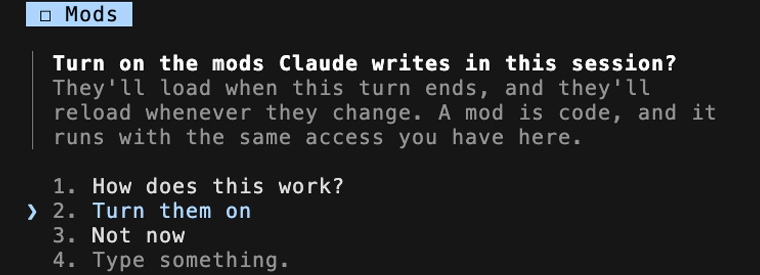
Claude Code asks you Turn on the mods Claude writes in this session? Choose Turn them on, the second option: go down with the arrow and press Enter. Careful: the one already selected is the first, How does this work?, and that one only explains it. If you press Enter twice in a row, it ends up as no.
It went well if you see a line with your mod's name and This mod is now loaded.Test it
Paste these two sentences, one after the other, waiting for Claude to finish the first. One creates a test folder and the other deletes it, so nothing of yours gets touched:
FirstCreate a folder called brake-test with three text files.
ThenNow delete the brake-test folder.
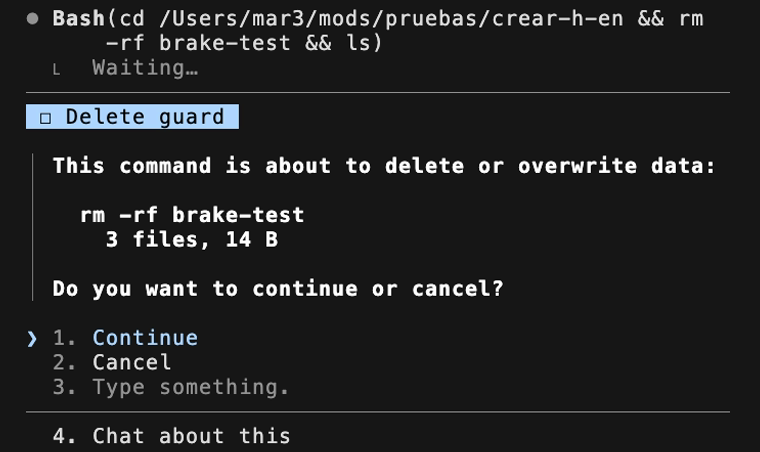
It went well if, before deleting, Claude stops, tells you how many files there are and how much they weigh, and lets you choose to continue or cancel. If you cancel, nothing gets deleted.The brake watches delete commands, not when Claude overwrites a file, and sometimes it asks more than it needs to. Without auto mode, after the brake you also get the usual permission prompt. Claude doesn't see the brake's box: in one of my tests it said it hadn't fired when it had, and offered to fix it. If that happens, tell it that it did fire. Claude will tell you what it covers and what it doesn't: read it.
If something's off, tell it
Tell it like you'd tell a person. For example: also ask me before touching my invoices folder. If it doesn't count the files right, tell it that too: in one of my tests it showed 0 files and in another it didn't even stop, because Claude created and deleted the folder in the same command. That's why this test is two sentences. The mod reloads by itself when Claude finishes.
Keep it
So far, your mod only exists in this conversation, and Claude Code deletes that folder after a while (a month, unless you changed it). Paste this and it stays. If it asks for permission, just say yes, without choosing the option that allows more things:
Keep itSave this mod in ~/mods/brake and keep it on in all my sessions by adding its full path to CLAUDE_CODE_PLUGIN_DIRS in the env of ~/.claude/settings.json. First make a copy of that file and show me the change. If that variable already has other paths, keep them. Do not change anything else in that file and check that it is still valid.
It went well if you open a new conversation and your mod still works. From here on it runs in all your sessions and with your permissions, so keep only the ones you tested. If you update Claude Code, repeat the test: a mod can stop working without warning.
02A panel of buttons
Five steps, top to bottom.
⌄
A panel of buttons
Five steps, top to bottom.
Ask for it
Open Claude Code and start a new conversation: in the terminal, by typing
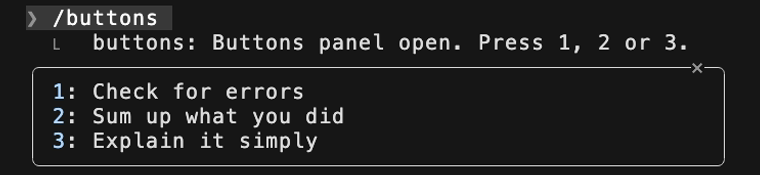
claude; in VS Code, from its panel. Paste this:The promptMake me a mod with a panel with three buttons: Check for errors, Sum up what you did and Explain it simply. Each button has its own key: 1, 2 and 3. The panel opens with /buttons, ready to press. Pressing one sends that sentence to Claude as if I had typed it.
Swap the three sentences for the ones you always type.
With Sonnet it took one to three minutes. With Opus on high effort, about 13 in my test. If you want it fast, first type
/model sonnet; it stays for your next conversations, and to change it type/model. If you don't have auto mode, it will ask for permission several times, with long commands and sometimes odd-sounding warnings, because it's reading and writing the mod: choose plain Yes, without the options that allow more things. The question in the next step may show up while it is still writing: answer it anyway. Claude will give the mod whatever name it likes. If it offers to upload it to GitHub, you don't need to: say no.It went well if you get the question in the next step and Claude tells you the mod is written.Turn it on
Claude Code asks you Turn on the mods Claude writes in this session? Choose Turn them on, the second option: go down with the arrow and press Enter. Careful: the one already selected is the first, How does this work?, and that one only explains it. If you press Enter twice in a row, it ends up as no.
It went well if you see a line with your mod's name and This mod is now loaded.Test it
Type
/buttonsand press Enter. The panel opens. Now press the 2 key.
If the key does nothing, press Ctrl+X and then Tab. In VS Code, click the button. To close the panel, Ctrl+X and then X.
It went well if your second sentence shows up in the chat and Claude answers, as if you had typed it.If something's off, tell it
Tell it like you'd tell a person. For example: add a fourth button or change a sentence. The mod reloads by itself when Claude finishes.
Keep it
So far, your mod only exists in this conversation, and Claude Code deletes that folder after a while (a month, unless you changed it). Paste this and it stays. If it asks for permission, just say yes, without choosing the option that allows more things:
Keep itSave this mod in ~/mods/buttons and keep it on in all my sessions by adding its full path to CLAUDE_CODE_PLUGIN_DIRS in the env of ~/.claude/settings.json. First make a copy of that file and show me the change. If that variable already has other paths, keep them. Do not change anything else in that file and check that it is still valid.
It went well if you open a new conversation and your mod still works. From here on it runs in all your sessions and with your permissions, so keep only the ones you tested. If you update Claude Code, repeat the test: a mod can stop working without warning.
02Hide data while recording
Five steps, top to bottom.
⌄
Hide data while recording
Five steps, top to bottom.
Ask for it
Open Claude Code and start a new conversation: in the terminal, by typing
claude; in VS Code, from its panel. Paste this:The promptMake me a mod so I can record my screen: in the messages and results shown on screen, hide the name Carlos Vega and any amount in euros like €18,400. /hide turns it on and /unhide turns it off. What Claude reads internally does not change.
Swap the name for the ones you want to hide.
With Sonnet it took one to three minutes. With Opus on high effort, about 13 in my test. If you want it fast, first type
/model sonnet; it stays for your next conversations, and to change it type/model. If you don't have auto mode, it will ask for permission several times, with long commands and sometimes odd-sounding warnings, because it's reading and writing the mod: choose plain Yes, without the options that allow more things. The question in the next step may show up while it is still writing: answer it anyway. Claude will give the mod whatever name it likes. If it offers to upload it to GitHub, you don't need to: say no.It went well if you get the question in the next step and Claude tells you the mod is written.Turn it on
Claude Code asks you Turn on the mods Claude writes in this session? Choose Turn them on, the second option: go down with the arrow and press Enter. Careful: the one already selected is the first, How does this work?, and that one only explains it. If you press Enter twice in a row, it ends up as no.
It went well if you see a line with your mod's name and This mod is now loaded.Test it
Type
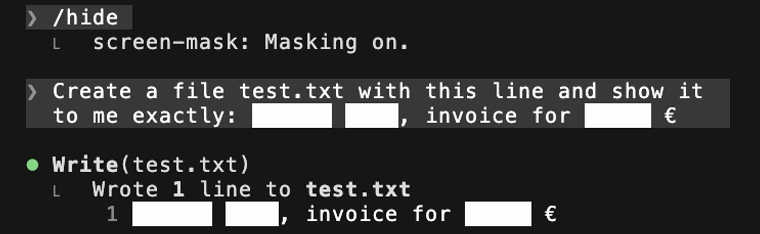
/hideand press Enter. Then paste this. If you changed the name in the prompt, change it here too:The testCreate a file test.txt with this line and show it to me exactly: Carlos Vega, invoice for €18,400
It went well if you see a block instead of the name and the amount. Then type/unhideand ask it to show you again: it has to look normal.It hides what you asked for and only that. In my test, emails and phone numbers were still showing, what you type in the box shows until you send it, permission windows aren't hidden, and in VS Code, the tab title and what you open in the editor aren't hidden either. When you turn it off, what was hidden shows again: stop recording first. Always watch the video before you post it.
If something's off, tell it
Claude writes the mod each time, so no two come out the same. In one of my tests, the command to turn it off didn't bring the text back. If that happens, tell it just that: it's still hidden after I turn it off, fix it. Same if you want to hide more things, like emails or phone numbers. The mod reloads by itself when Claude finishes.
Keep it
So far, your mod only exists in this conversation, and Claude Code deletes that folder after a while (a month, unless you changed it). Paste this and it stays. If it asks for permission, just say yes, without choosing the option that allows more things:
Keep itSave this mod in ~/mods/hide and keep it on in all my sessions by adding its full path to CLAUDE_CODE_PLUGIN_DIRS in the env of ~/.claude/settings.json. First make a copy of that file and show me the change. If that variable already has other paths, keep them. Do not change anything else in that file and check that it is still valid.
It went well if you open a new conversation and your mod still works. From here on it runs in all your sessions and with your permissions, so keep only the ones you tested. If you update Claude Code, repeat the test: a mod can stop working without warning.
02The mod you want
Five steps, top to bottom.
⌄
The mod you want
Five steps, top to bottom.
Ask for it
Open Claude Code and start a new conversation: in the terminal, by typing
claude; in VS Code, from its panel. Paste this:The promptI want Claude Code to [what you want, in your own words]. Before writing anything, tell me if it already does that out of the box and how to use it. If it doesn't, make me a mod.
The first thing it tells you is whether it already exists. If Claude Code already does it, you don't need a mod: note how to use it and you're done. What a mod does best is draw something new on screen, stop before an action or change what you see.
With Sonnet it took one to three minutes. With Opus on high effort, about 13 in my test. If you want it fast, first type
/model sonnet; it stays for your next conversations, and to change it type/model. If you don't have auto mode, it will ask for permission several times, with long commands and sometimes odd-sounding warnings, because it's reading and writing the mod: choose plain Yes, without the options that allow more things. The question in the next step may show up while it is still writing: answer it anyway. Claude will give the mod whatever name it likes. If it offers to upload it to GitHub, you don't need to: say no.It went well if you get the question in the next step and Claude tells you the mod is written.Turn it on
Claude Code asks you Turn on the mods Claude writes in this session? Choose Turn them on, the second option: go down with the arrow and press Enter. Careful: the one already selected is the first, How does this work?, and that one only explains it. If you press Enter twice in a row, it ends up as no.
It went well if you see a line with your mod's name and This mod is now loaded.Test it
Do exactly what you asked for, in a test folder if it can touch your files.
It went well if what you asked for happens, without having to remind it.If something's off, tell it
Tell it like you'd tell a person: what you expected and what happened. The mod reloads by itself when Claude finishes. If you see a line starting with your mod's name saying the change didn't load, paste it to Claude.
Keep it
So far, your mod only exists in this conversation, and Claude Code deletes that folder after a while (a month, unless you changed it). Paste this and it stays. If it asks for permission, just say yes, without choosing the option that allows more things:
Keep itSave this mod in ~/mods/my-mod and keep it on in all my sessions by adding its full path to CLAUDE_CODE_PLUGIN_DIRS in the env of ~/.claude/settings.json. First make a copy of that file and show me the change. If that variable already has other paths, keep them. Do not change anything else in that file and check that it is still valid.
It went well if you open a new conversation and your mod still works. From here on it runs in all your sessions and with your permissions, so keep only the ones you tested. If you update Claude Code, repeat the test: a mod can stop working without warning.
+If something fails
What happened to me and what the documentation says.
⌄
If something fails
What happened to me and what the documentation says.
It says Unknown command
The mod isn't on. Usually that's because you didn't choose Turn them on. The easiest way: open a new conversation, ask again and this time choose Turn them on.
I chose Not now
Same as above: open a new conversation, ask again and choose Turn them on.
Claude says it can't
Check that you're in a folder you told Claude Code you trust: it asks the first time you open it. Without that it doesn't load. And on a work computer, your company may have mods blocked.
I use VS Code
The brake worked for me in VS Code. Panels show up from version 2.1.299, and buttons are pressed with a click, not with their key. If something in your mod doesn't show up, ask Claude to draw it in a panel.
+Remove a mod
Just as easy.
⌄
Remove a mod
Just as easy.
Ask Claude: remove the brake mod from all my sessions. Or type /plugin, press Tab until the Installed tab, pick your mod and turn it off with Space. In VS Code, type /plugins and do it from Manage plugins.
+For the curious
What a mod is on the inside and why you're the one who turns it on.
⌄
For the curious
What a mod is on the inside and why you're the one who turns it on.
A mod is a code file that Claude Code runs when something happens, like a tool call or something being drawn on screen. Claude writes it in ~/.claude/dev-mods/, with help from a skill it comes with, plugin-authoring.
That's why it asks before turning it on: a mod runs with your same permissions and can do whatever you can do on your computer. With one you asked for, you know what you asked for: check that it does that. With someone else's, check first who made it. More in the official documentation.
Tested on November 3, 2026 with Claude Code 2.1.317 in a Mac terminal with Sonnet, and the brake also in VS Code with Opus and in the terminal without auto mode, on a Max plan with my setup, in test folders.