Jobs and clients · Step by step

ManyChat, but free.

Someone comments a word on your post and gets your link by private message, automatically. That is what OpenReply does, and it is free, open source software. This guide takes you from zero to your first automatic message with no coding: you answer one question and you only see the steps for your case.

the software is free
no coding needed
official Instagram API
no per-contact fees

A note from me before you start :)

If you do not have a technical background, I get that this can feel a bit overwhelming at first. I trust that you can do it!! You do not need to know anything beforehand, just follow the steps in order and take your time. If you get stuck, give the link to this guide to the AI you use and ask it every question as you go. It takes a little while, but you will get there! You got this <3

Mar

00

What it really costs

read this first

The software is free. What can cost money is the place where it lives.

⌄

OpenReply has to be on 24 hours a day to reply when someone comments. For that it needs a computer that is always on and connected to the internet (a server). These are your options:

Where it livesPer monthHow you set it up
Railway€5 to €7With clicks, no terminal. The easiest route.
A rented serverAbout €5With an AI that installs it for you and explains as it goes (on the subscription you already pay for).
A server you already have€0 extraSame: an AI installs it on your server.
Oracle's free tier€0Same, but getting the free machine takes more patience.

Everything else is free: OpenReply, the connection to Instagram (free with your Meta app; with Zernio, free up to 10,000 messages a month) and the email you sign in with. ManyChat is free up to 25 active contacts a month; after that it starts at $17 a month (about €15) with 250 active contacts, and goes up with your contacts.

Railway: Hobby plan, $5 a month with $5 of usage included; if you use more in a month, you pay the difference. Plan for between €5 and €7. Prices checked on 2026-11-15 on each service's website. They can change.

01

Where will you set it up?

start here

Answer and the guide shows you only the steps for your case.

⌄

Do you already have a server that is on 24 hours a day?

Where would you rather set it up?

You can change your answer whenever you want: the guide remembers the last one in this browser.

02

Set it up on Railway

your route

Six steps, all with clicks. About 20 minutes.

⌄

Railway is a company that rents out the place where your OpenReply lives. One button sets up the four pieces (the website, the program that sends the messages, the database and the queue) from OpenReply's official code.

  1. Create your Resend account and your key

    OpenReply has no password: every time you sign in, it emails you a link. That email is sent by Resend, which is free.

    • Go to resend.com and create an account. Note which email you sign up with: it is the only email you will be able to sign in to your OpenReply with.
    • In the left menu, click API Keys and then Create API Key.
    • Give it a name (for example openreply), leave the rest as it is and click Add.
    • Copy the key (it starts with re_) and save it in your Notes app. It is only shown once.

    It went well if you have saved a key that starts with re_.

  2. Create your Railway account

    Go to railway.com, click Login and create your account with your email or with GitHub. Then turn on the Hobby plan ($5 a month): click your picture, bottom left, go to Account Settings, then Plans, and choose Hobby.

    Railway offers a free trial, but new accounts can get a limited one (Limited Trial), and with it OpenReply cannot talk to Instagram. That is why this guide goes straight to the Hobby plan.

    It went well if Plans says your plan is Hobby.

  3. Click the button

    With your Railway account open, click here:

    Set up OpenReply on Railway

    A Railway page opens. Click Deploy Now and you will see a list with four pieces. The one called openreply asks you for two things; click its Configure button and fill them in:

    • RESEND_API_KEY: your Resend key, the one that starts with re_.
    • ALLOWED_EMAILS: the email you signed up to Resend with. That way only you can get in.

    Save (Save Config) and click Deploy, at the bottom of the page. Railway makes up the internal passwords by itself: you do not have to create any.

    It went well if you see a board with four boxes: openreply, worker, Postgres and Redis.

  4. Wait for it to build

    It takes between 5 and 10 minutes. Each box changes status while it builds.

    It went well if the four boxes end up green (Online or Active).

    If one ends up red, click it, open Deployments and click View logs: the error is at the end. See If something fails.

  5. Note your address

    Click the openreply box. Under its name you see its address, something like openreply-production-1a2b.up.railway.app. Copy it and note it with https:// in front: it is your address, and you will use it several times.

    Open it in your browser adding /api/health at the end.

    It went well if it says "status":"ok" at the top. That means the four pieces are talking to each other.

  6. Sign in to your OpenReply

    Open your address (without /api/health). Type your email, the Resend one, and click the button to sign in. You get an email with a link: click it. If you do not see it, check spam.

    It went well if you see the OpenReply dashboard, with the menu on the left: Dashboard, Inbox, Campaigns, DM Logs and Settings. On your phone, the menu is behind the Menu button.

Your OpenReply is now on. Next, connect your Instagram: continue with step 03.

03

Connect your Instagram

for everyone

With your own Meta app, free and with no one in between (set aside an hour), or with Zernio, in ten minutes.

⌄

OpenReply can talk to Instagram in two ways: directly, with a Meta app in your name, or through Zernio, a service that acts as a bridge.

Pick one and stick with it: if you later move from Zernio to your Meta app, or the other way around, you will have to create your campaigns again, because they do not move from one connection to the other by themselves.

Before you start, have at hand:

  • Your Instagram account in professional mode (Business or Creator). To switch it: in Instagram, open Settings, search for "account type" and change it. It is free and you can undo it.
  • On that account, Allow access to messages turned on. In the Instagram app: Settings and activity, Messages and story replies, Connected tools. Without it, OpenReply sees the comments, but Instagram does not let it send the message.
  • A second Instagram account (a friend's will do) for the final test. OpenReply does not reply to your own comments.

How do you connect it?

For this path, also have at hand:

  • A Facebook account, to sign in to Meta's site.
  • Your address, the one you wrote down in step 02.

Meta's screens appear here with their English names.

  1. Create the app

    • Go to developers.facebook.com/apps with your Facebook. If it is your first time, it asks you to register as a developer: it is free.
    • Click Create app. Give it a name (for example, Ana's OpenReply) and an email you actually check.
    • In Use cases, check All on the left and pick only Manage messaging & content on Instagram.
    • If it asks for a business portfolio (Business), you can continue without picking one. Finish with Create app.

    Do not check the ads use case (Marketing API) or Authenticate and request data from users with Facebook Login. With those, the connection fails later.

    It went well if you see your app's dashboard, with its name at the top.

  2. Attach it to a business portfolio

    In the left menu, go to Use cases and click Customize on the Instagram one. Open API setup with Unified login: Meta warns that a business portfolio is required.

    • Click + Business portfolio. If you already have one, pick it. If not, create a new one with your name and your email.
    • If it offers to verify it, click Verify later: you do not need it for your own accounts.

    It went well if the orange portfolio warning is gone.

  3. Create the login configuration

    • On that same screen, under 1. Configure your app, click Create new configuration and then Create from template, without changing anything.
    • Below, in Register a new redirect URL, paste this with your address and click Save:
    Redirect URL
    https://YOUR-ADDRESS/api/instagram/callback

    It went well if the configuration Instagram API (unified login) shows up with its number (Configuration ID). Write it down.

  4. Fix its permissions

    The template comes with ads permissions OpenReply does not use, and it is missing one it cannot work without: business_management. You fix it in two places:

    • On the same Customize screen, on the left, go to Permissions and features. Search for business_management and click Add. Do the same with instagram_manage_insights, the one for stats.
    • In your app's left menu, open Facebook Login for Business and then Configurations. On your configuration, the one with the same number, click Edit. Do not create another one.
    • Click Next until you reach Permissions. Keep these five checked: instagram_basic, instagram_manage_comments, instagram_manage_messages, business_management and instagram_manage_insights. Uncheck ads_management, ads_read and instagram_content_publish, and save.

    If business_management does not show up in the list, the first point is missing. And if you skip this step, connecting looks fine, but OpenReply says No Instagram account is assigned to this login.

    It went well if it says 5 options selected and the configuration keeps its number.

  5. Give OpenReply your app's three values

    NameWhere it is in Meta
    META_LOGIN_CONFIG_IDYour configuration's number (Configuration ID), the one you wrote down.
    META_APP_IDIn App settings, Basic: the App ID.
    FACEBOOK_APP_SECRETOn the same page: App secret, clicking Show.

    In Railway: click the openreply box, open Variables and click Raw Editor. At the end of what is there, paste these three lines with your values after each =, and click Update Variables. Do the same in the worker box. Then click Deploy, at the top: until you do, Railway does not apply the changes.

    To paste in openreply and in worker
    META_LOGIN_CONFIG_ID=
    META_APP_ID=
    FACEBOOK_APP_SECRET=

    It went well if, after restarting, /api/health still says "status":"ok".

  6. Tell Meta where to send the alerts

    This is the "someone commented" alert (a webhook). Go back to API setup with Unified login and open 3. Configure webhooks:

    • In Callback URL, paste https://YOUR-ADDRESS/api/webhook with your address.
    • In Verify token, paste the value of your WEBHOOK_VERIFY_TOKEN. In Railway it is in the openreply box, Variables tab: click the eye to see it and copy it.
    • Click Verify and save. If the button is gray, paste the token again.
    • Subscribe to comments and messages. Without messages, replying to direct messages and to stories does not work.

    It went well if step 3 shows the green check and both fields show as Subscribed.

  7. Put your Instagram in the portfolio

    When you connect, Meta only shows the Instagram accounts that are inside your portfolio.

    • Go to business.facebook.com/settings and check, at the top left, that it is your portfolio.
    • Open Accounts and then Instagram accounts. Click Add and then Add Instagram account.
    • An Instagram window opens. Sign in with the account you are going to use: if it suggests another one, switch accounts before you confirm.

    If that Instagram account has an ad account connected, it moves with it into your portfolio, and Meta warns that it cannot be removed afterward.

    If your browser blocks the window, allow pop-ups from business.facebook.com with the icon in the address bar. If it shows up blank, reload it, or repeat the step in an incognito window.

    It went well if your account shows up in Instagram accounts.

  8. Publish the app

    While the app is "in development", Instagram does not send alerts for real comments. In your app's left menu, go to Publish. It asks for three legal pages, and OpenReply already ships them. Paste these, with your address:

    The three pages
    https://YOUR-ADDRESS/privacy
    https://YOUR-ADDRESS/terms
    https://YOUR-ADDRESS/data-deletion

    Then publish.

    It went well if your app goes from Development to Live.

  9. Click Connect Instagram

    In your OpenReply, click Connect Instagram, at the top right (on mobile it says Connect). Meta opens its window:

    • Click Continue with and your name: your Facebook, the same one you created the app with.
    • In Business portfolio, your portfolio. In Instagram account, your account.
    • Ad account is optional: leave it empty. Do not click Create a new ad account.
    • Click Next, review the permissions and click Confirm.

    It went well if you land back in OpenReply and your @account shows at the top right.

With this configuration, access does not expire: you do not have to reconnect every so often.

If your account was ever connected to ManyChat or a similar tool, see If something fails: there is one more setting.

04

The final test

for everyone

A test campaign and a comment from another account.

⌄
  1. Create a test campaign

    • In OpenReply, go to Campaigns and create a new campaign.
    • Under When someone comments on, choose a specific post or reel and tap one of your posts.
    • Under And this comment has, type the word TEST.
    • Below, under And then, they will get, write a message. Click + Add A Link and paste any link there.
    • Click Go Live, top right.

    It went well if the campaign shows as LIVE.

  2. Comment from the other account

    With your second Instagram account, comment TEST on that post. It does not work from your own account: OpenReply ignores your comments on purpose. Wait a minute and check DM Logs in OpenReply.

    It went well if the send shows as Sent in DM Logs. On the other account, the message may be in Message requests, especially if that account does not follow you.

It is all set up. Below you have how to create your real campaigns and what to do if something fails.

05

How to use it: your first real campaign

Each option in the editor, with its real name and what it does.

⌄

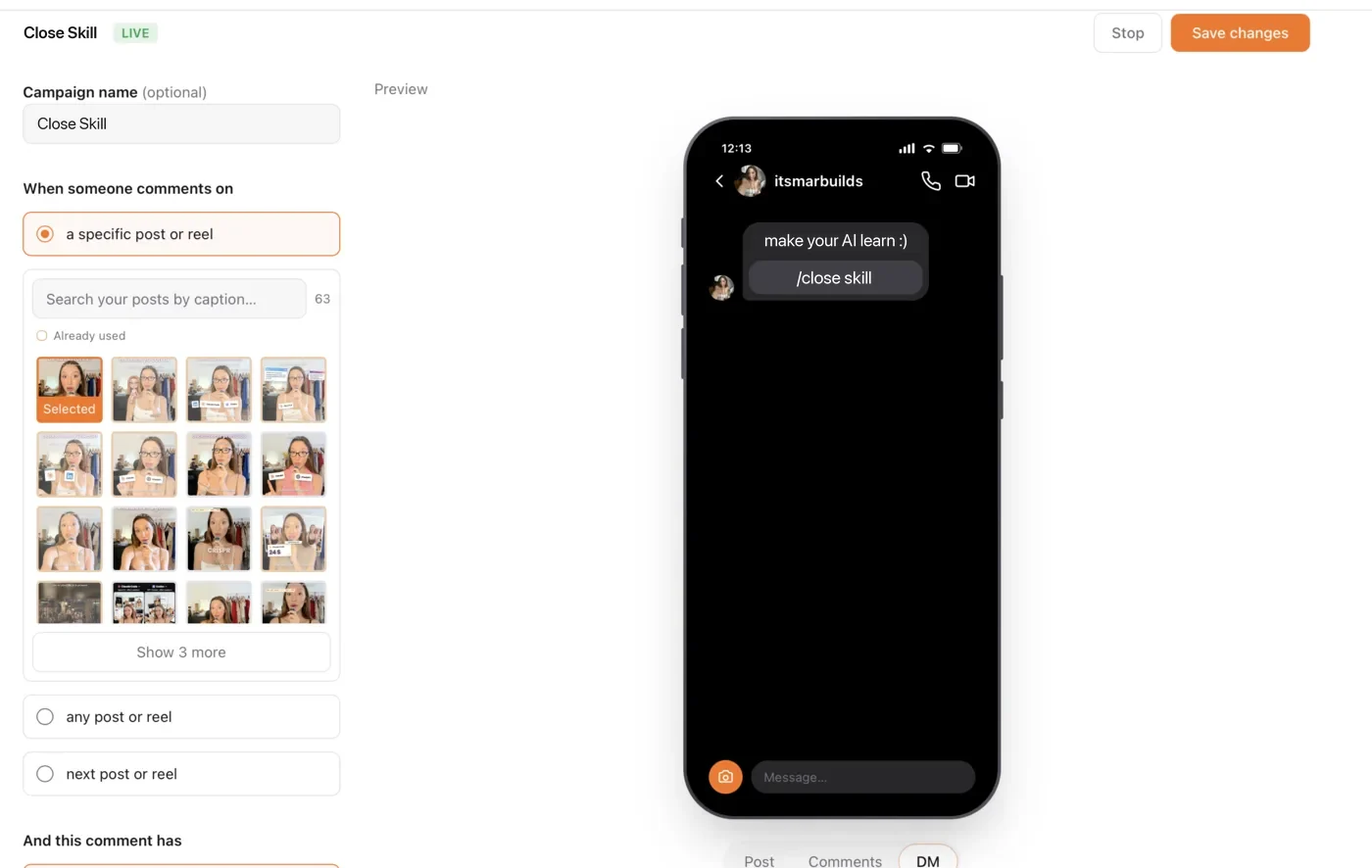
Everything happens in Campaigns, creating a new campaign. The options are on the left and a phone with the preview is on the right.

OpenReply's campaign editor: the campaign options on the left and the preview on a phone on the right
A campaign that is already live, which is why it says Save changes at the top. In a new one, the button is Go Live.
  1. Where: "When someone comments on"

    a specific post or reel: one post, which you pick from the grid. any post or reel: all your posts. next post or reel: the next reel you publish (it does not work for photos or carousels); it attaches a few minutes after you publish it.

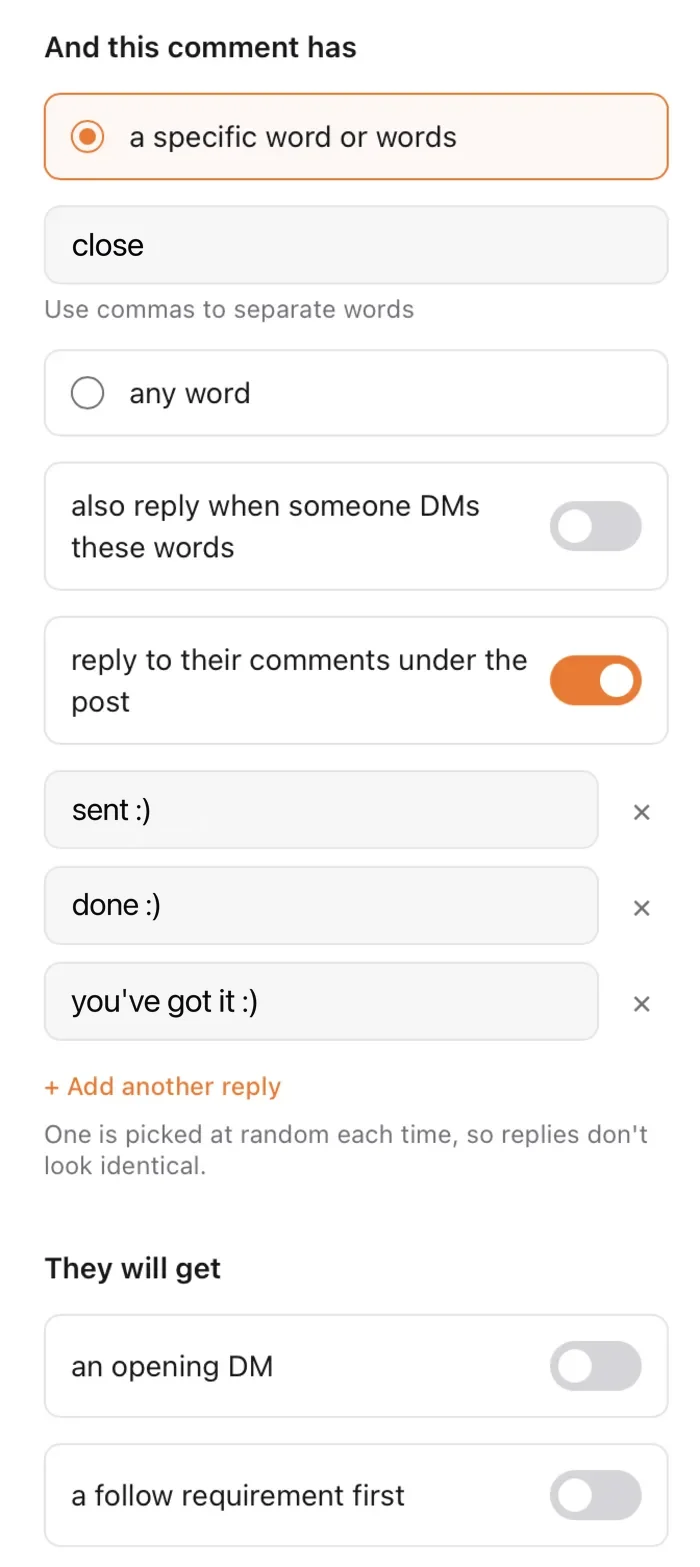
  2. Which word: "And this comment has"

    a specific word or words, separated by commas, or any word to reply to any comment. It ignores capitals and accents, and it looks for the whole word: open does not trigger on "openai".

  3. Also by private message or Stories

    Turn on also reply when someone DMs these words: the same word works if they send it to you by private message or as a reply to a Story.

    If you chose any word above, this switch replies to every private message you get.

  4. The public reply

    With reply to their comments under the post, on top of the message it replies under the comment. Add several with + Add another reply ("sent :)", "it's in your inbox :)"): it picks one at random each time.

  5. Before the link: "They will get"

    an opening DM first sends a message with a button, and the link arrives when they tap it. a follow requirement first asks them to follow you first. Both are optional: with neither, the link arrives directly.

  6. The message with the link

    Under a DM with a link you write the message (with {username} if you want their name). Then click + Add A Link and put the address and the button text there. Do not paste the address inside the message: it would arrive with no button and no click count.

  7. Turn it on and test it

    Click Go Live. Stop pauses it. Test it by commenting the word from another account.

The message options in OpenReply's editor: the opening message, the follow requirement and the message with the link

Where to see how it is going

In Dashboard, this month's clicks; in Campaigns, each campaign's; and in DM Logs, every send with its result and the reason if it failed.

Replying by hand

In Inbox you read your conversations and reply from the dashboard, within the 24 hours Instagram allows for replying.

06

If something fails

What you see, and what to do.

⌄

Two places almost always say what is going on: your address with /api/health at the end, and DM Logs inside OpenReply.

If you seeDo this
The sign-in email does not arriveCheck spam. Sign in with the same email you signed up to Resend with: with the test sending address, Resend only sends to that one. And that same email has to be the one in ALLOWED_EMAILS.
"status":"degraded" in /api/healthSee which piece fails: database, redis or worker (the worker fails if it says "healthy":false). If it is the worker, on Railway click the worker box and look at its logs; on your server, give the text to your AI.
A Railway box in redClick it, open Deployments and View logs. If you do not understand the error, copy it and paste it to the AI you use. To try again, click the three dots on the deployment and Redeploy.
Invalid platform app when connecting InstagramYour Meta app is one of the new ones, and your OpenReply is trying to connect the old way. Check that you set META_LOGIN_CONFIG_ID in step 03. If you set up your OpenReply before November 21, 2026, update it first: it is in For the curious, under "Keeping it up to date".
No Instagram account is assigned to this loginWith a new Meta app: your configuration is missing business_management, or your Instagram is not in your portfolio. Go over "Fix its permissions" and "Put your Instagram in the portfolio" in step 03, and click Connect Instagram again.
When connecting, the list of Instagram accounts is emptyWith a new Meta app: your Instagram is not in your business portfolio yet. See "Put your Instagram in the portfolio" in step 03.
The Zernio API key is invalid or expiredThe key was copied wrong or has expired. Create another one in Zernio and paste it again.
Use an unrestricted, read-write Zernio keyThe key has some limit. Create another one that is unrestricted, with read and write access and Inbox access.
Create a profile in Zernio, then refresh this pageThere is no profile in Zernio yet. Create it, connect your Instagram to that profile and reload the OpenReply page.
With Zernio, my Instagram account does not appear in SettingsYou still need to click Save profile and configure webhook. If you already did, check in Zernio that your Instagram is connected to the profile you chose.
Insufficient developer roleWith an earlier Meta app: you still have to accept the invite inside Instagram. Adding yourself in Meta is not enough.
The callback URL or verify token couldn't be validatedWith your Meta app: check that the address ends in /api/webhook, that your OpenReply is on and that the token is exactly your WEBHOOK_VERIFY_TOKEN.
The send shows as Failed in DM Logs, or you see The account owner has disabled access to Instagram Direct Messaging Outside of Instagram AppYour account does not let other apps send messages for you. Turn on Allow access to messages (step 03, under "Before you start") and comment again from the other account.
Everything looks fine, and no message arrivesMost often: you are commenting from your own account. If you connect with your Meta app, it may still be in development: publish it. On the other account, also check Message requests.
The first message arrives, but tapping its button does nothing (not the thread owner)Another tool, like ManyChat, still owns your conversations. Disconnect Instagram from inside that tool. Then, in Meta Business Suite, go to Settings, Integrations, Conversation routing, choose your account, click Manage next to your app and turn on Access all conversations and Take control of conversations.
Unsupported request - method type: get when connecting a second accountWith an earlier Meta app: each Instagram account needs its own accepted invite on your app.
The same message arrives twiceTwo workers are on at the same time (for example, one on Railway and one on a server). Keep only one and delete the other.
Railway has stopped my servicesYour account is not on the Hobby plan or the payment failed. Check it under Account Settings, Plans.

OpenReply's official guide has more cases: docs/setup.md.

+

For the curious

The pieces inside, Instagram's limits, how to update it and what changed at Meta.

⌄

The pieces, with their names

PieceWhat it does
The web app (openreply)The dashboard where you create campaigns, and the door through which Instagram reports each comment.
The workerThe program that sends the messages. That is why it has to be always on.
The daily jobsOn a server, once a day the Instagram access of Meta apps from before October 2026 is renewed and your follower count is saved. On Railway they do not run, so the follower chart stays empty.
PostgresThe database: your campaigns and the log of sends.
RedisThe queue: where messages wait until the worker sends them.

Instagram's limits still apply

OpenReply uses the official API, with no tricks or passwords. The limits are the same as with ManyChat: one private reply per comment, and a cap on replies per hour. OpenReply stays under 750 per hour and queues the rest.

Only for your accounts

This is for those who connect with their own Meta app. Without Meta's review (App Review), your app only connects your own accounts and those of people with a role on it. To connect other people's accounts you have to pass that review, which requires a registered business.

What changed at Meta

Since October 2026, new Meta apps only offer API setup with Unified login, which connects your Instagram through a business portfolio. OpenReply supports it since November 21, 2026; before that, a new app gave the error Invalid platform app. Earlier apps keep working as always, with Instagram login.

Keeping it up to date

On Railway, click the openreply box, open Settings and click Check for updates. Do the same in worker. It does not update by itself: that way a change in the project does not catch you by surprise. If you set it up before November 21, 2026, update it before you connect a new Meta app.

Your keys

The only one you must never change is ENCRYPTION_KEY: if it changes, you have to connect Instagram again. As for the rest, if one ends up pasted in a chat or somewhere public, change it.

Stopping the payments

On Railway, delete the project (Settings, Danger) and, if you do not use it for anything else, cancel the Hobby plan under Account Settings. Your campaigns are lost with the database.