15 Claude Code mods, tested one by one.
Before installing one, check whether Claude Code already does it. A mod changes how Claude Code looks and behaves from the inside. I tested these 15 in test folders. For each one I tell you what it does, who made it, whether it uses your plan, what Claude Code already did without mods and how to check it works. Also what it doesn't do.
A mod runs with your permissions: only install ones from people you trust. More on this.
+What do you want to get?
start hereChoose and I'll leave only the ones for that.
⌄
What do you want to get?
start hereChoose and I'll leave only the ones for that.
+How to install one
It's two lines, and they work for almost all of them.
⌄
How to install one
It's two lines, and they work for almost all of them.
Copy the lines on its card
Each mod has its own. Paste them into Claude Code one at a time and press Enter after each. In VS Code it's done from
/plugins: Marketplaces tab to add, and Install on the mod.It went well if, after the first, it says Successfully added marketplace.Choose Install for you
The second line opens a screen with the mod's details and who made it. The selected option, Install for you, installs it just for you: press Enter.
It went well if you see Installed and Plugin is now active.Test it
For testing, use a folder you don't care about: ask Claude
create a mods-test folder with three text files. Then do what the card says. If its command doesn't exist, open a new conversation so it loads.
Words you'll see: a subagent is a helper Claude that Claude launches for part of the task; context is what Claude has in its head for this conversation; a turn is each time it answers you; Haiku is the cheapest model; a band is the strip above where you type.
+Before installing someone else's
A mod can do whatever you could do on your computer.
⌄
Before installing someone else's
A mod can do whatever you could do on your computer.
A mod runs with your same permissions: it can read your files and your keys, see every message, approve actions without asking and use your plan. It isn't inside any isolated box. Only install ones from people you trust: each card says who made it and links to it.
Before installing one, ask Claude to review it: download the code from [the mod's link] into a temporary folder and tell me what it does with my files and keys, and whether it connects to the internet.
To remove one, type /plugin, press Tab until the Installed tab, pick it and turn it off or uninstall it there. In VS Code, type /plugins and do it from Manage plugins. Anthropic's depend on the folder you clone: if you move or delete it, they stop loading.
01Blast Radius
Protect your work
⌄
Blast Radius
Protect your work
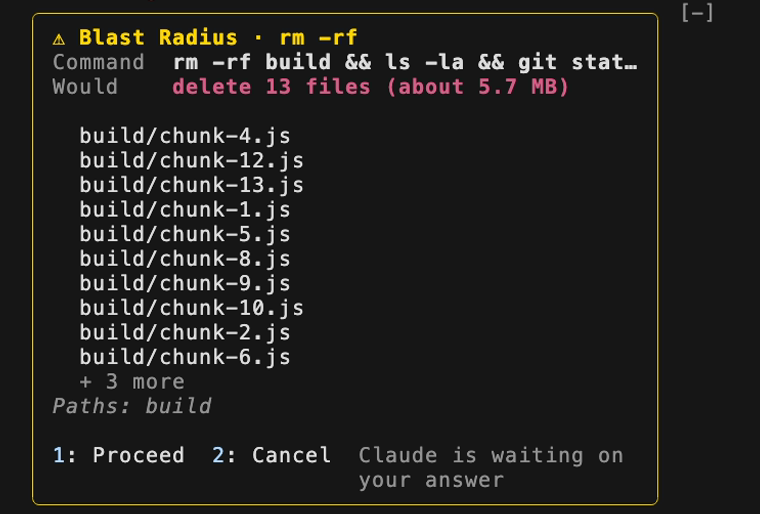
It stops the most dangerous commands, like rm -rf or git reset --hard, shows you what would go and lets you continue or cancel. It's the one from my video on what a mod is.
- Who made it
- Anthropic, as a sample (its repository says it is not an official product) · see its code
- Whether it uses your plan
- It doesn't use your plan: your computer does the counting.
- What Claude Code already did
- Claude Code already asks for permission, but it doesn't tell you how much would go.
Clone https://github.com/anthropics/claude-code-playground into the folder ~/mods/claude-code-playground. Do nothing else.
/plugin marketplace add ~/mods/claude-code-playground/claude-code/mods
/plugin install blast-radius@claude-code-playground-mods
Test it: Ask it to delete your mods-test folder with rm -rf. If you choose Proceed, it really gets deleted.
02Collision Guard
Protect your work
⌄
Collision Guard
Protect your work
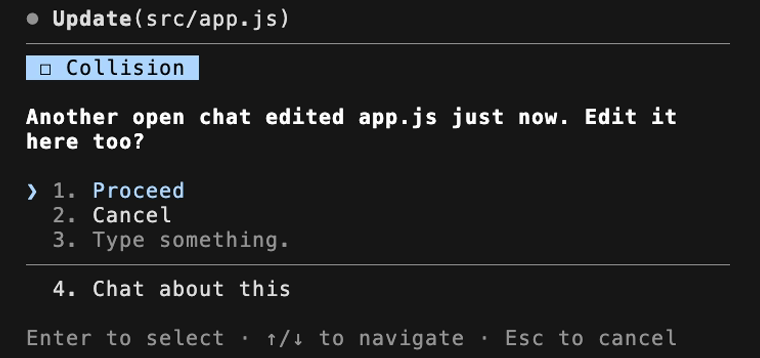
If you have two conversations open and one is about to touch a file the other just changed, it warns you first.
- Who made it
- Nate Herk · see its code
- Whether it uses your plan
- It doesn't use your plan.
- What Claude Code already did
- Claude Code doesn't do this out of the box.
/plugin marketplace add nateherkai/claude-code-mods
/plugin install collision-guard@nateherk-mods
Test it: Open two conversations in the same folder and ask both to change the same file.
03Recording Mode
Protect your work
⌄
Recording Mode
Protect your work
It hides keys, emails and phone numbers in the chat so you can record. /rec turns it on or off, depending on how it is, and /rec off always turns it off.
- Who made it
- Nate Herk · see its code
- Whether it uses your plan
- Almost nothing: one note per message.
- What Claude Code already did
- Claude Code doesn't do this out of the box.

/plugin marketplace add nateherkai/claude-code-mods
/plugin install recording-mode@nateherk-mods
Test it: Check whether it says REC at the bottom: if not, type /rec. Then ask: create a file notes.txt with this line and show it to me: ana@example.com
04Mission Control
See what it's doing
⌄
Mission Control
See what it's doing
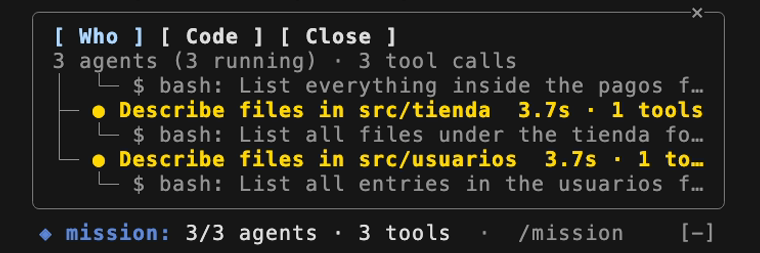
A live panel with what each subagent is doing, file by file. /mission who opens it.
- Who made it
- Hamza Zafar · see its code
- Whether it uses your plan
- Yes: one Haiku call on turns with edits.
- What Claude Code already did
- Claude Code already shows your subagents and their tokens. This adds the detail of each file.
/plugin marketplace add hamzafer/claude-code-mods
/plugin install mission-control@claude-code-mods
Test it: Type /mission who and ask: launch three subagents in parallel, each one reads a file from my test folder and tells me what's in it.
05Flightdeck
See what it's doing
⌄
Flightdeck
See what it's doing
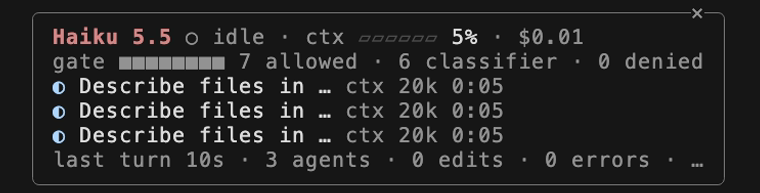
A panel with your subagents, the permissions requested and what the session has cost so far. /flightdeck opens it.
- Who made it
- Stephen Casella · see its code
- Whether it uses your plan
- It doesn't use your plan.
- What Claude Code already did
- You can already see your limits and cost with /usage, and Claude Code already shows your subagents. What it adds is putting it together with the permissions in one panel.
/plugin marketplace add scasella/claude-flightdeck
/plugin install flightdeck@claude-flightdeck
Test it: Type /flightdeck and ask: launch three subagents in parallel, each one reads a file from my test folder and tells me what's in it.
06Replay Theater
See what it's doing
⌄
Replay Theater
See what it's doing
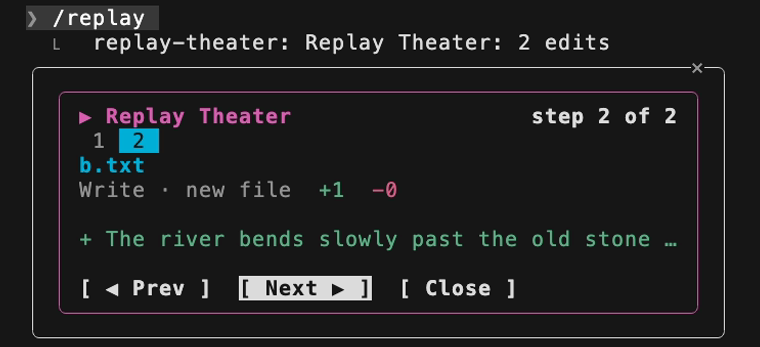
With /replay you step through the edits Claude made in the last turn.
- Who made it
- Anthropic, as a sample · see its code
- Whether it uses your plan
- It doesn't use your plan.
- What Claude Code already did
- /diff already shows you the changes. This shows them in order, one by one.
Clone https://github.com/anthropics/claude-code-playground into the folder ~/mods/claude-code-playground. Do nothing else.
/plugin marketplace add ~/mods/claude-code-playground/claude-code/mods
/plugin install replay-theater@claude-code-playground-mods
Test it: Ask: create two text files with one sentence each. Then type /replay.
07Usage Meter
Spend less
⌄
Usage Meter
Spend less
A bar above where you type with your 5-hour and weekly limits.
- Who made it
- Hamza Zafar · see its code
- Whether it uses your plan
- It doesn't use your plan.
- What Claude Code already did
- /usage already tells you, and in the terminal the status line can always show it. What it adds is having it ready-made.

/plugin marketplace add hamzafer/claude-code-mods
/plugin install usage-meter@claude-code-mods
Test it: Type anything.
If you'd rather have a panel your way, like the one in my video, paste this to Claude and choose Turn them on. Without auto mode, it will ask for permission several times: plain Yes. It only lives in that conversation: to keep it, follow the Keep it step, swapping my-mod for your mod's name.
Make me a mod with a small panel that shows, with one line for each item, how much context I've used, my 5-hour limit and my weekly limit, and updates on its own. It opens with /my-panel.

08Token Weather
Spend less
⌄
Token Weather
Spend less
A line above where you type with how your context is doing, like a weather report.
- Who made it
- Anthropic, as a sample · see its code
- Whether it uses your plan
- It doesn't use your plan.
- What Claude Code already did
- /context already tells you, and in the terminal the status line can show it. What it adds is the report, ready-made.

Clone https://github.com/anthropics/claude-code-playground into the folder ~/mods/claude-code-playground. Do nothing else.
/plugin marketplace add ~/mods/claude-code-playground/claude-code/mods
/plugin install token-weather@claude-code-playground-mods
Test it: Type anything.
09Model Router
Spend less
⌄
Model Router
Spend less
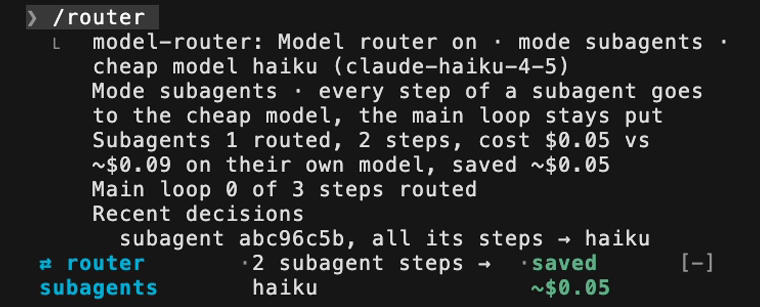
It sends your subagents' work to a cheaper model. Your main conversation stays on the model you have.
- Who made it
- Prompt Advisers · see its code
- Whether it uses your plan
- In my test it showed an estimated saving of a few cents, at API prices. On a paid plan it isn't money you get back.
- What Claude Code already did
- You can already set your subagents' model. This changes it with a command and shows what it estimates you save.
/plugin marketplace add promptadvisers/claude-mods-starter-kit
/plugin install model-router@claude-mods-kit
Test it: If your model is already Haiku, it does nothing: use another. By default it sends to Sonnet; here we set it to Haiku. Type, one at a time, /router on, /router mode subagents and /router haiku. Then ask for something with a subagent and type /router.
10Context Keeper
Spend less
⌄
Context Keeper
Spend less
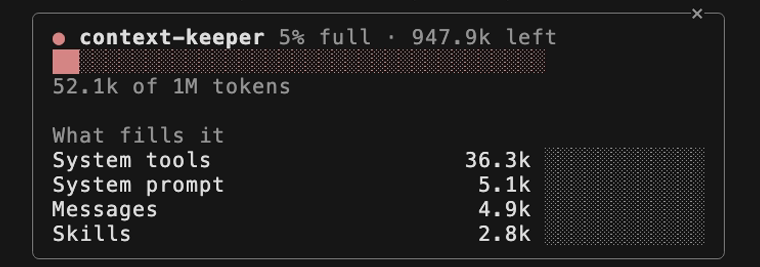
A panel with what fills your context and a button that writes a handoff note to carry on in another conversation. /ctx opens it.
- Who made it
- Michael Goldenberg · see its code
- Whether it uses your plan
- Only the handoff note, which it also writes on its own when context reaches 85%.
- What Claude Code already did
- /context already shows what fills your context. The note is what it adds.
/plugin marketplace add mishgoldenberg/claude-mods
/plugin install context-keeper@claude-mods
Test it: Ask it any question. Then type /ctx, press Ctrl+X and then Tab, and press the c key; in VS Code, click Checkpoint. To carry on in a new conversation, ask: read the latest note in .claude/checkpoints and tell me where we were.
11Your own rule that picks the model
Spend less
⌄
Your own rule that picks the model
Spend less
You decide the rule. For example: Haiku answers the short stuff, and the model you have on answers the long stuff.
- Who made it
- Claude writes it for you
- Whether it uses your plan
- Haiku costs less. That said, in a long conversation it can cost more, because switching models loses the cache.
- What Claude Code already did
- /model already switches models, and a subagent can already use Haiku. What it adds is your rule, on each message.

Make me a mod: if my message has fewer than 15 words Haiku answers it, and if it's longer, the model I have on. Show on screen which model answered each time. Call it model-rule.
Test it: Choose Turn them on. Ask it a short question and then a long one.
12You Should Know
Have it help on its own
⌄
You Should Know
Have it help on its own
A second Claude rereads the conversation while it works and tells you if something got missed.
- Who made it
- Anthropic, comes inside Claude Code, turned off
- Whether it uses your plan
- Yes, and it uses your plan even if it doesn't show you any note.
- What Claude Code already did
- This one is a built-in mod: you turn it on, if it shows up in /plugin.
/plugin enable cc-plugin-you-should-know@builtin
Test it: Work as usual on a long task.
13Reflect
Have it help on its own
⌄
Reflect
Have it help on its own
When you correct Claude, it offers to save that correction as a rule for good.
- Who made it
- Bayram Annakov · see its code
- Whether it uses your plan
- Yes: it checks each short message with Haiku.
- What Claude Code already did
- Claude Code's auto memory already saved that same correction without the mod. What it adds is that you decide where it gets saved.

/plugin marketplace add bayramannakov/claude-reflect
/plugin install reflect-mod@claude-reflect-marketplace
Test it: Correct Claude on something: no, in this project always use this.
14Next Steps
Have it help on its own
⌄
Next Steps
Have it help on its own
Up to three suggestions for what to ask next, above where you type.
- Who made it
- Hamza Zafar · see its code
- Whether it uses your plan
- Yes: one call per turn.
- What Claude Code already did
- Claude Code already suggests one in gray inside the box. This gives you several.

/plugin marketplace add hamzafer/claude-code-mods
/plugin install next-steps@claude-code-mods
Test it: Ask for a small task in your test folder.
15One session telling another on its own
Have it help on its own
⌄
One session telling another on its own
Have it help on its own
Every time a task finishes in one conversation, it sends a message to another, without you asking.
- Who made it
- Claude writes it for you: I found none ready-made
- Whether it uses your plan
- Yes: the conversation that gets the message reads it with its Claude.
- What Claude Code already did
- Claude can already message another session, and ask for a notice when that one finishes. What the mod adds is your rule: it tells it when what you decide happens.

Make me a mod: every time you finish a task here, you send a message on your own to my other session, the one with id [paste the Session ID here], saying in one sentence what you finished.
Test it: In the other conversation type /status and copy the Session ID. Paste it in the prompt, choose Turn them on and ask for a small task.
Tested in a Mac terminal and most also in VS Code, in test folders and with fake data, between November 2 and 3, 2026, with Claude Code 2.1.316 and 2.1.317, on a Max plan. Mods get updated: what works this way today may change.